Court Records online give Bernalillo County residents instant access to case filings, motions, and judgments, letting you verify party names, docket numbers, and hearing dates without leaving home. By entering a case number or party name, the court record database returns up‑to‑date public court documents, from complaints and petitions to final dispositions, while flagging sealed or juvenile files that remain restricted. This fast court record request streamlines the search for official copies and saves time compared to a manual clerk visit.
When a search returns no results, the system may be delayed for recent filings or missing entries, prompting a follow‑up with the court clerk for certified copies and fee details. Understanding the nuances of public court records versus sealed or expunged files helps you avoid common pitfalls like incorrect jurisdiction or outdated party information. Use the Bernalillo County court information portal to confirm case status, retrieve exhibits, and ensure your records are accurate before proceeding.
How to Search Court Records
Court Records searches begin with the correct court and enough case details to produce a narrow, checkable result. A case number offers the cleanest match, while a party name can help when the number is unknown. The official bernalillo county District Court page is the verified starting point for court links, clerk requests, and current directions. The steps below show how to use that source without confusing a directory result with the full case file.
Official Search Portal: https://seconddistrict.nmcourts.gov/location-hours-contacts/
Steps to Search
- Open the official New Mexico Courts website and select Bernalillo County District Court (Second Judicial District).
- Enter the exact case number or search using the party’s full legal name.
- Apply filing-date and case-type filters to narrow results.
- Verify the court name, case number, filing date, case type, and status.
- Review available docket entries and document titles.
- Save the search details for future reference; request certified copies separately if needed.
- If no result appears, contact the court clerk with the party name, case number, filing year, and document details.
Court Record Search
A court record search works best when each field points to the same case. A case number identifies the file, the caption names the parties, and the docket shows how the case moved through court. The right combination of details also helps the clerk locate a file that has not yet appeared in the public directory.
Required Search Details
Use the fewest details that can produce one clear result. A full case number is usually enough for a case-number search. A name search needs the legal party name, while a date search works best with a filing year or date range. If several results appear, add the court, case type, filing year, or assigned judge rather than guessing which result is correct.
A docket number and a case number often refer to the same identifier in an online court system. Some screens label the field “Docket Number,” while other screens use “Case Number.” Copy the full identifier and confirm the court before treating either label as a separate case. For a name search, begin with the caption printed at the top of the case’s first legal document. A party may appear under a middle initial, shortened first name, business abbreviation, or later legal name. Try one variation at a time so you can judge which change produced the result. A matching case type and filing year can then confirm the match.
Case Type Filters
Case-type filters help distinguish records with similar names or case numbers. Criminal cases can be searched by defendant name, case number, filing year, and court division. Civil cases use party names, case category, and filing year. Family cases require party names and case details, with some records protected by privacy rules. Probate cases may be searched by estate, decedent, or petitioner name. Juvenile cases may have restricted access and may not appear in standard public searches.
Case Filings and Proceedings
Case filings are the papers entered into a court case, along with the entries that record court activity. A public directory may provide a short history, while the underlying file contains the pleadings, responses, rulings, notices, exhibits, and other records created during the case. Reading those parts in sequence shows how a dispute moved from filing to disposition.
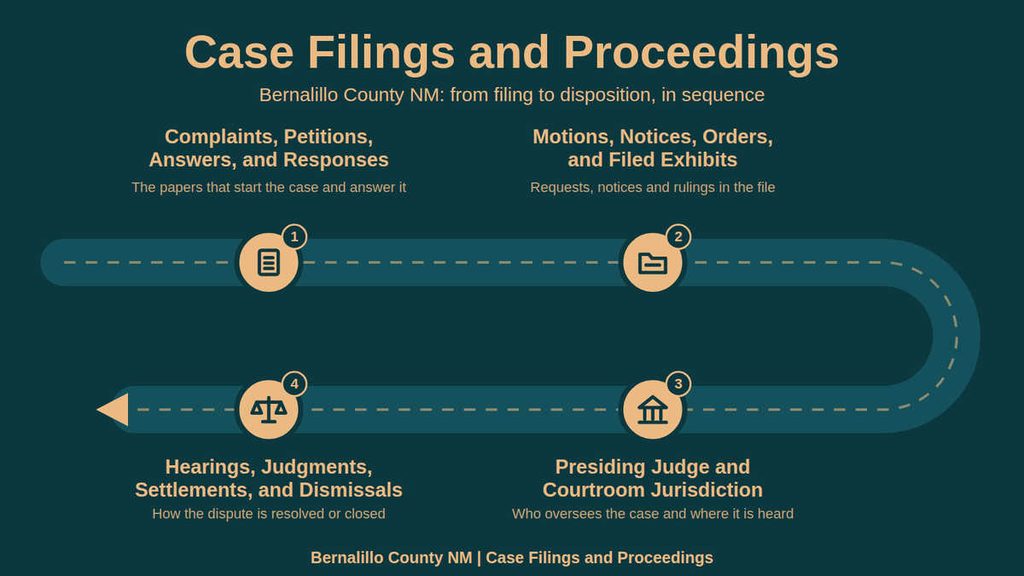
Complaints, Petitions, Answers, and Responses
The opening filing depends on the case type. A civil action often begins with a complaint that states the claims and requests relief. A family or probate matter may begin with a petition, such as a petition concerning a marriage, divorce, guardianship, or estate. In a criminal case, the court file may begin with a complaint, criminal information, or indictment, depending on the charges and court process. The answer or response is the opposing party’s written reply to the starting document. It may admit or deny factual allegations, answer legal claims, raise defenses, or request relief from the court. An answer does not by itself decide the case. Later pleadings, motions, orders, trial entries, and disposition records show how the court handled the dispute.
Motions, Notices, Orders, and Filed Exhibits
A motion asks the court to take a specific action. The supporting papers explain the request, and the judge’s order shows whether the court granted, denied, or changed it. Motions can cover many topics, including case management, evidence, discovery, property, fees, and requests to end or continue a case. The motion title alone may not reveal the legal effect of the filing, so read the related order. Court notices record scheduled events, requests, or required actions. A hearing notice can help confirm the date and courtroom shown in the case history.
An order can resolve a motion, set a hearing, decide a disputed issue, or direct the parties to complete a step. Signed orders usually carry more formal weight than an informal online notice. Filed exhibits are documents attached to a filing as support or evidence. They may include contracts, photographs, correspondence, medical records, property records, or other claimed material. A directory may list an exhibit bundle without showing every page. For a specific exhibit, request it by title, filing date, description, and the related motion or order.
Presiding Judge and Courtroom Jurisdiction
The assigned judge and courtroom help confirm the correct court and case assignment. The judge listed in a public result reflects the assignment shown by that system, which may not list every earlier, temporary, or prior judge. A case caption, appointment order, or later docket entry can provide a more complete assignment history. A case filed in another court may not appear in the Bernalillo County District Court system, even when a party lives in Bernalillo County.
Venue depends on the court named in the filing and the subject of the case. A wrong court choice can create an empty search even when the case exists elsewhere. Do not choose a judge or courtroom as the first search field unless the case number and court are unknown. Names can be shared, and a hearing assignment can change. A case number paired with the correct court produces a more dependable starting point.
Hearings, Judgments, Settlements, and Dismissals
A hearing entry records a scheduled court event, such as a status conference, motion hearing, trial, or other appearance. It does not contain the full testimony by itself. Minutes may summarize what happened, while a written transcript may require a separate request to the court reporter. These records serve different purposes, so identify the exact type needed. A judgment is a court ruling recorded in the case. A criminal disposition and a civil judgment may use different forms and terminology. Read the judgment text, the date entered, and any later enforcement or satisfaction entry.
A directory label such as “closed” describes the court’s recorded status, yet the file may contain documents that explain how the case ended. Settlements often lead to a filed stipulation, notice, or dismissal. The full settlement agreement may remain private, so the public file can show that a case settled without revealing every term. A dismissal entry can close the matter, and its wording may state whether the dismissal carries prejudice. For case history, read the dismissal or judgment together with any settlement filing and later order.
- For a criminal matter, review the disposition entries and any judgment connected with the charges.
- For a civil matter, check for a judgment, stipulation of dismissal, or other close-of-case filing.
- For a family or probate matter, look for the decree, order, settlement filing, or disposition recorded by the court.
- For a hearing, distinguish the calendar notice, minute entry, written order, and transcript before requesting records.
Public Availability and Official Copies
A public case listing and a complete court file are not the same thing. Checking official dui public search provides direct confirmation when evaluating public records. Public directories can provide useful case details, while certified copies and some nonpublic records follow separate procedures. Knowing which records are viewable, which require a request, and which cannot be released helps prevent false conclusions from an incomplete result.
Public Case Directories and Search Logs
A public case directory acts as an index. Depending on the system, it may show the case number, caption, case type, assigned judge, filing date, hearing schedule, status, and links to selected entries. Some entries may open as document images, while other records require a clerk request. The screen can also show a document title without providing the document itself.
A search log is a record of what you searched and what the system displayed. Keep the search date, terms, case number, filters, and result pages. A printed result or screenshot can help you compare later searches, yet it does not carry the same authentication as a certified copy. If a filing must prove the content of a court record, request an official copy from the clerk.
Sealed, Expunged, and Juvenile File Rules
Public court records do not mean that every document in every case may be viewed by the public. Sealing, expungement, juvenile protections, and other legal restrictions can limit what appears online. The result may show a case number and basic case details while withholding pleadings, exhibits, or later filings.
A missing search result does not always mean that no case exists. It may mean that the file is restricted, stored outside the current directory, or indexed under a different name. The clerk may be able to confirm a restricted file’s existence without disclosing its contents. Disclosure still depends on law and the court’s current order.
Court Clerk and Certified Copy Requests
The court clerk manages the case file and the records requested from the court. A regular copy reproduces the filed paper. A certified copy includes the clerk’s authentication that the document is a true copy of the court record. Some documents follow a separate process, including transcripts that may come from the court reporter rather than the clerk.
- Identify the exact case by full case number and the legal names shown in the caption.
- List each requested document by title, filing date, and description. “The whole file” can include many records that are not needed for your purpose.
- State whether you need a regular copy, a certified copy, or both. Ask the clerk to confirm which form can be provided for each paper.
- Review the current fee, accepted payment method, delivery choice, and request method before submitting payment.
- Use the official court contact process and keep the receipt, request number, payment confirmation, and delivery tracking details.
- Open the delivered copy and confirm that the case number, document title, pages, and certification match your request.
Ask about special delivery needs at the time of the request. The supplied official source identifies the clerk’s phone and hours, yet it does not list a full copy-request form or every payment option. Use the court’s current instructions instead of an old form taken from a third-party page.
Copy Fees and Processing Timelines
The official contact page supplied for this page lists the court location, main phone, and clerk hours. It does not provide a copy-fee amount or a guaranteed production time. Do not rely on an old fee figure, turnaround promise, or third-party ordering form without checking with the court first. Ask for a current estimate rather than treating any date as a promise. Record the date you submitted the request, the promised period, and the date you received it. If the file contains many requested papers, a partial delivery can occur if the clerk needs to confirm the scope or payment first.
Court Records and Related Public Sources
Court records contain documents filed in a case, while a court docket lists filings, hearings, and rulings. A case file includes the case documents, and a court calendar shows upcoming hearings. Criminal records may include court and law-enforcement details, while arrest records document arrest or custody events without proving guilt. Public records cover a broader range of government information, including court records, though some records may be restricted.
Record Accuracy and Resolution
A failed search often results from a small mismatch rather than a missing case. Names can be shortened, numbers can be copied with one wrong character, and cases can be stored under a different court or category. A structured check helps you find the real file and confirm what the record actually says.
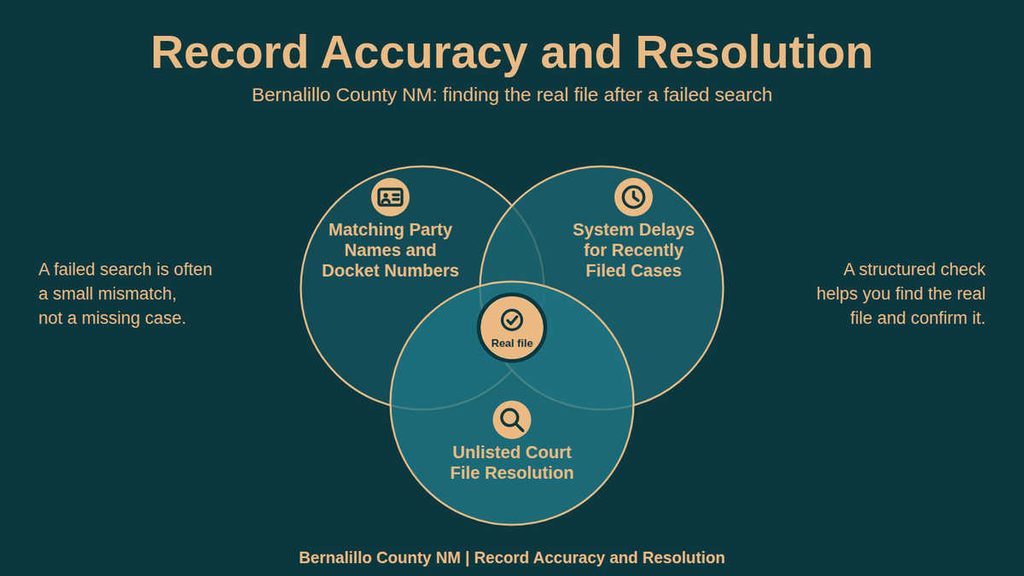
Matching Party Names and Docket Numbers
Copy the case number into the search field without changing its formatting. Then compare the returned court, case caption, case type, filing year, and party names with the source. A case-number search can still produce the wrong result if the same number was entered under another court or if one digit was changed. Confirm that the court reads Bernalillo County District Court or the Second Judicial District. Check the case type against the filing that supplied the number. Compare each party name in the caption, including initials and business abbreviations. Check the filing year and the date of the first known document. Confirm the assigned judge and latest status against a recent docket entry. Contact the clerk if the case number is right but the file still does not open or update.
System Delays for Recently Filed Cases
A recently filed document may not appear in the public directory at once. Clerk entry, scanning, indexing, and system processing can occur at different times. Compare the filing date with the last docket date shown by the search system. Look for the case by its full number and then by the exact party name. Check for a document title that may use a shortened description. Keep the filing receipt, file-stamped copy, or confirmation showing when the paper was accepted. A “case not found” message does not prove that no case was filed. The same message can reflect a recent filing, a different court, a name mismatch, a restricted file, or an older record outside the current search directory.
Unlisted Court File Resolution
An unlisted court file may exist under another case caption, in an older storage system, or under a court assignment that differs from the first guess. The resolution process works from the most exact identifiers to broader checks.
Have these details ready when you contact the court:
- Full case number, or every part of the number you know.
- Exact legal names of the parties.
- Case type and likely court division.
- Filing year, filing date, or approximate date range.
- Document title and a clear description of what you need.
- Whether you want a regular copy or a certified copy.
- A safe method for the court clerk to confirm details with you.
If the matter is sealed, expunged, or juvenile, explain that the search produced no usable public result. Ask for the proper procedure rather than asking the clerk to bypass a restriction. The answer may confirm a file’s status, request a more specific search, or explain why the record cannot be viewed by the public.
Contact Details
Use the details below for questions about locating a case, requesting records, checking current fees, or confirming clerk hours. The official source identifies the court as Bernalillo County District Court in the Second Judicial District.
Call during the listed hours before visiting to confirm the proper office, current copy fees, accepted payment methods, and pickup or delivery rules. For a case-specific request, have the full case number, exact party names, filing year, and document title ready. Use the court’s official process so your request reaches the staff member who can locate the correct file.
Frequently Asked Questions
Finding court records helps you verify case outcomes, confirm legal status, and gather evidence for personal or professional matters. Accessing official court documents saves time and reduces uncertainty. The Bernalillo County District Court site offers direct links for online searches, request forms, and contact details. Knowing how to locate case numbers, party names, and filing dates makes the lookup quick and reliable.
How can I search court records online for a specific case in Bernalillo County?
Start at the New Mexico Courts website and select the Bernalillo County District Court link. Enter the case number if you have it; this returns the cleanest match. If the number is unknown, type the party name or filing date in the search fields. Review the list of matches, click the desired case, and download PDFs of motions, orders, and judgments. Most records are free, though certified copies may require a small fee.
What steps are needed to request official court record copies by phone or mail?
Call the clerk’s office at 505‑841‑7554 during business hours to confirm the record’s availability. Provide the case number, party names, and filing date. Ask for the form required for a written request and note any identification you must include. Mail the completed form with payment for copying fees to the courthouse address. Expect processing within ten business days unless the record is sealed or archived.
Can I look up court case records by party name when the case number is unknown?
Yes. Use the “Party Name Search” field on the online portal. Enter the full name or a partial phrase; the system returns all cases that match. Filter results by case type, such as civil, criminal, or family, to narrow the list. Open each entry to see docket numbers, filing dates, and document links. This method works well for recent filings and for tracking ongoing proceedings.
What are the main reasons a court record search returns no results?
Typical issues include entering an incorrect case number, misspelling a party name, or selecting the wrong jurisdiction. Records may also be sealed, expunged, or still in the archiving process, which hides them from public view. Verify the court’s name and double‑check spelling before resubmitting. If the case is older than ten years, contact the clerk to request archived files.
How do I find the status and disposition of a criminal case in Bernalillo County?
Locate the case using its number or the defendant’s name on the online search page. Click the case to view the docket, which lists each filing, hearing, and final judgment. The “Disposition” field shows whether the case was dismissed, convicted, or settled. For detailed outcomes, download the judgment or sentencing order. If the record is not online, request a copy from the clerk using the phone number provided.